Payment guide · Litecoin recommended
How to pay with crypto
New here? It takes about 10 minutes the first time. We recommend Litecoin (LTC), low fees, confirms in minutes, easy to buy in Australia.
Products are supplied for laboratory research use only.
Recommended: Litecoin
Litecoin (LTC)
Litecoin (LTC), low fees, confirms in ~2–5 min, and simple to buy in Australia. It's the easiest path for most buyers and keeps your purchase off your bank statement.
Step by step
Step 1: Get a crypto wallet
A crypto wallet is a free app that holds your coins and lets you send payments, set up once. Easiest all-rounder: Exodus (mobile + desktop, supports BTC + LTC, can buy in-app). For Monero: Cake Wallet (mobile) or Feather (desktop).
Only install the official app, the publisher should read Exodus Movement. Avoid look-alike copies.
Step 2: Get some Litecoin (two ways)
There are two ways to get Litecoin into your wallet. Pick whichever suits you , Route A is the simplest if you just want to pay and go; Route B costs a bit less.
Route A, Easiest (one app): buy inside Exodus
In the Exodus app, open Settings → Currency and set it to AUD, then use the built-in Buyfeature to purchase Litecoin with your card. Buy a little more than your order total, a 3–5% buffer covers fees and rate movement so you're not left short. You'll do a quick one-time ID check the first time. The Litecoin lands straight in your Exodus wallet, no exchange account and no transfers. When it arrives, skip ahead to Step 3 to place your order and pay. Heads up: in-app buys carry a slightly higher fee than an exchange, that's the price of the convenience.
Route B, Lowest fees: buy on an Australian exchange
An exchange turns Australian dollars into crypto for a lower fee, then you move it to your own wallet. CoinSpot (instant AUD via PayID, beginner-friendly) or Swyftx (low fees).
- Create an account and verify your ID (required by law on every AU exchange, normal).
- Deposit AUD (PayID is usually instant).
- Buy Litecoin, a little more than your order total (a 3–5% buffer covers fees and rate movement).
Then withdraw to your own wallet:
- Open your wallet, tap Receive, copy your LTC address.
- On the exchange go to Withdraw, choose Litecoin, paste your address.
- Confirm, usually arrives in minutes (first withdrawal may be held 24–48h).
Step 3: Place your order
Add your items, enter shipping, choose Crypto Payment, place the order. On screen you'll see: the Crypto Payment option with the BTCPaybadge; "A secure payment window will open on this page, no redirect needed."; "30 min to complete payment"; the tip "Litecoin (LTC) is easiest, lowest fees, confirms in ~2–5 min, and simple to buy in Australia."; and the button "Pay with BTC, LTC or XMR".
You'll tick two required boxes (18+ & Terms; research-use-only). The payment screen then opens right on the page, no redirect, no new tab.
Step 4: Pay on the in-page screen
The payment screen does the work; Litecoin is selected by default. On screen you'll see: heading "Pay with crypto" + a "Time left" countdown (30 min); coin tabs LTC ("Recommended"), BTC, XMR; a QRwith "Scan the QR or copy below, works with any wallet."; "Amount to send" (exact amount, "Tap to copy", plus "(≈ A$… estimate)"); the "Litecoin address" (its own "Tap to copy"); and "Open in wallet app" captioned "Only works if your wallet is set to open Litecoin links, otherwise scan the QR or copy above."
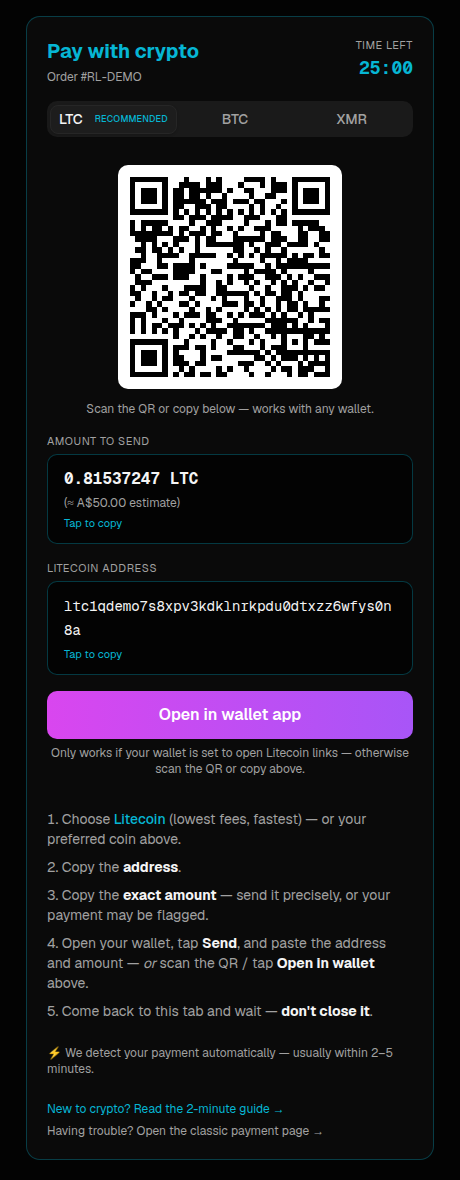
To pay:
- Tap Tap-to-copy under Amount (never type it, a wrong amount flags a manual check).
- Tap Tap-to-copy under the address.
- In your wallet tap Send, paste both, confirm (or scan the QR).
- Come back to the tab and wait, don't close it. It shows "We detect your payment automatically, usually within 2–5 minutes." then flips to "Payment received".
After you pay
We detect it automatically, no “I’ve paid” button. Usually 2–5 min for Litecoin. Keep the tab open.
You’ll get an email, a “complete your payment” email links to your order page; a “Payment Confirmed” email follows; later, a tracking email when it ships.
Need to step away? Your order page has an “Open payment window” button to resume any time (confirm the email you used at checkout).
Sent it and nothing's changed after 30 minutes? Email support@retalabs.is with your order number.
FAQ
Paying with Bitcoin or Monero instead?
Bitcoin (BTC)
Bitcoin works the same on the payment screen (BTC tab, copy amount + address or scan QR), but fees are higher and confirmation slower (10–60 min). Send promptly; if the window passes you're still covered. Litecoin is simpler for most.
Monero (XMR), advanced
Monero offers the strongest privacy but is the advanced option and isn't necessary here (LTC already keeps the order off your bank statement). Delisted on AU exchanges. If you already hold XMR, use the XMR tab + Cake/Feather. Otherwise use Litecoin.